


Web Usability Audit assesses your site. It tells where users get confused, lost, or leave and why. This analysis uses analytics, session recording, and expert analysis to find issues on your money-making pages, such as your home, pricing, signup, and checkout pages. Most sites don’t have a traffic problem. They have a pricing page where 60% of visitors leave without scrolling, or a signup form that asks for a phone number nobody wants to give.
Start With the Pages That Make You Money
Auditing every page is not worth it. Start with the four or five pages around a conversion. Even a minor change can move the numbers.
| Page | What to check | Common problem |
| Homepage | Does a first-time visitor understand what you do in 5 seconds? | Vague headline like “Solutions for modern teams” |
| Pricing | Can users compare plans without scrolling back and forth? | Hidden limits, unclear plan differences |
| Signup | How many fields, and which ones cause drop-off? | Asking for company size and phone number upfront |
| Checkout | Are costs, errors, and next steps clear? | Shipping fees revealed on the last step |
| Product/feature pages | Do they answer the objections users actually have? | Feature lists with no proof or examples |
What a Web Usability Audit Looks At
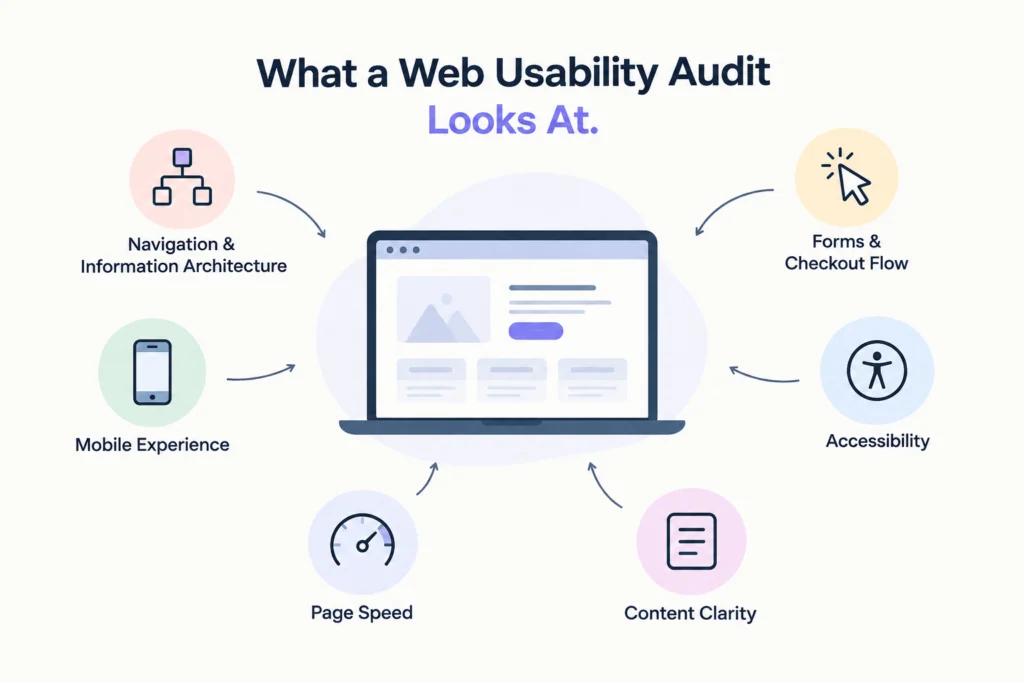
UX design audit ensures the website works for the first-time user while viewing on mobile devices and under time constraints.
It assesses the information clarity, consistency between the navigation labels and user expectations, design, website performance, mobile usability, and basic accessibility features like color contrast and tap targets.
Small things add up. A “Get Started” button that opens a demo form instead of a free trial breaks trust in one click.
Signs a Page Needs an Audit
Your analytics usually tell you where to look before anyone opens a design file.
| Signal | Red flag |
| Bounce rate | Above 70% on a landing or pricing page |
| Form abandonment | More than 40% of users who start a form don’t finish |
| Rage clicks | Repeated clicks on elements that aren’t links |
| Scroll depth | Most users never reach your main CTA |
| Mobile vs desktop conversion | Mobile converting at less than half the desktop rate |
| Support tickets | The same “how do I…” question every week |
Seeing these numbers on your key pages? UX Audit Tool helps startups and mid-sized teams get clear answers, not a 60-page report nobody reads. Start your audit.
How a Website UX Audit Works
A website ux audit mostly starts with data. Google Analytics or a similar tool shows where users drop off, and heatmaps show what they click and ignore.
Next come session recordings. Watching 20 or 30 real sessions on your signup page shows problems no dashboard will, like users hunting for a password rule that only appears after they fail.
Then an expert review checks each page against usability principles, such as whether error messages explain how to fix the error.
Finally, testing with five real users on your key tasks usually confirms the biggest issues. Five is enough to catch most major problems.
Fix the Right Things First
A user experience audit will surface dozens of issues. Fixing them in the wrong order burns your team’s time.
| Priority | Type of issue | Example |
| Fix now | High impact, low effort | Rewriting a confusing CTA label |
| Plan next | High impact, high effort | Rebuilding a multi-step checkout |
| Batch later | Low impact, low effort | Inconsistent icon styles |
| Skip for now | Low impact, high effort | Redesigning a rarely visited About page |
Every finding should come with evidence and a recommended fix. “The form is confusing” isn’t a finding. “34% of users fail the password step because the rules are hidden” is.
In-House Review vs UX Audit Services
| Factor | In-house review | UX audit services |
| Cost | Team time only | 2,000–15,000+ depending on scope |
| Objectivity | Low; the team knows the product too well | High, fresh eyes on every flow |
| Speed | Slow, competes with other work | 2–4 weeks typically |
| Output | Often a loose list of opinions | Prioritized findings with evidence |
| Best for | Quick checks on a single page | Full reviews of key flows before a redesign or launch |
Conclusion
Internal teams stop seeing problems after a few months. UX audit services bring in someone who uses your site the way a new visitor does.
Pick the one page that matters most to your revenue this quarter and watch ten recordings of real users on it. You’ll likely find your first fix before lunch.
Ready to find out what’s costing you conversions? Talk to UX Audit Tool about auditing your most important pages.
Frequently Asked Questions
What is included in a web usability audit for a SaaS website?
It usually covers analytics review, heatmaps, session recordings, a heuristic review of key pages, and testing with real users. The output is a prioritized list of issues with evidence and recommended fixes.
What is the cost of UX audit services for a small business?
The expected range is between $2,000 and $15,000. This price range is determined by the number of pages and flow. The audit of just three or four pages falls into the lower bracket.
How long does a website UX audit take to complete?
A UX audit for a website takes about 2 to 4 weeks. A single-page audit is quick, taking only a few days, while a product review might take longer.
How often should you run a user experience audit on your website?
Audit your user experience once every year, and then again before implementing any redesigns, price changes, or new products. Any page that shows a drop in conversion rate should be audited earlier.
What is the difference between a UX design audit and a usability test?
The UX design audit compares your site to data and usability principles. The usability test observes users performing tasks. Many audits incorporate usability testing for verification.